Preface
Due to being part of the Apple ecosystem, I purchased two HomePod Minis last month on the occasion of my birthday. I later discovered that third-party apps experience slight audio delays.
Interestingly, Apple Music—Apple's own service—appears to have no such delay. Apple's customer support explained this might be due to local network conditions.
Personally, I suspect the real reason is that third-party apps haven't properly optimized for HomePod. Since then, I've mostly used it to play daily song recommendations from NetEase Cloud Music during my free time.
My Mac has rarely been used since I got a desktop setup last semester, and has been sitting idle ever since.
Today at noon, I suddenly wondered whether the HomePod could be used with Windows. After some tinkering, I actually managed to make it work—hence this article, written solely for documentation purposes.
Operating Environment
- Windows 11 Pro
23H2 - HomePod Mini
17.4 - TuneBlade
1.8.0
Ensure that both the HomePod and Windows device are on the same local network.
Setup Steps
Install the Software
We'll be using TuneBlade, a highly practical local network streaming tool.
Official website: http://www.tuneblade.com/
Direct download: http://files.breakfreeaudio.com/downloads/TuneBlade_Installer_1_8_0_0.exe
Alibaba Cloud Drive: https://www.alipan.com/s/ym2ySALej7J
Installation is straightforward and no different from installing any regular application.
1713619304860.webp
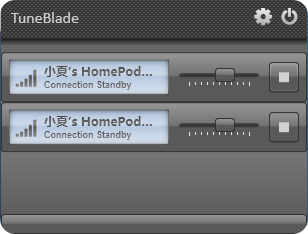
After installation and launch, the software will automatically scan for AirPlay-compatible speakers on the same network. Simply click the device you wish to connect to begin using it.
Note: The volume control icon in the Windows taskbar will show as "Muted" once connected.
Activate the Software
The free version of TuneBlade has limitations. Without a license, the connection will automatically disconnect after 10 minutes. The full version costs $9.99 to unlock.
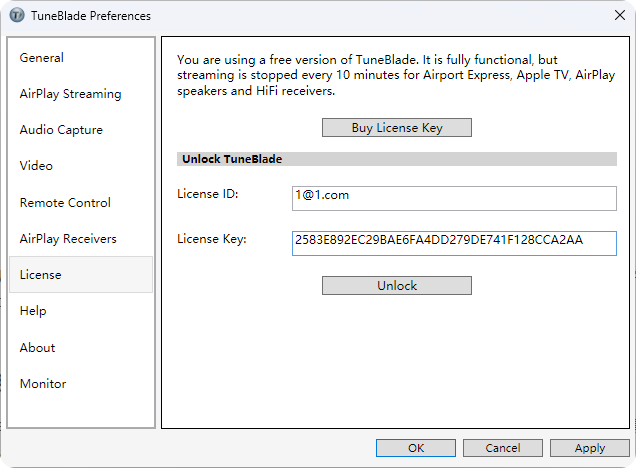
Below is a license key provided by online users, tested and confirmed to work:
1713619948756.webp
Registration email: 1@1.com CD Key: 2583E892EC29BAE6FA4DD279DE741F128CCA2AA Please support the developer if you are able to.
After entering the license information, click the "Unlock" button to activate.
Software Localization (Chinese Translation)
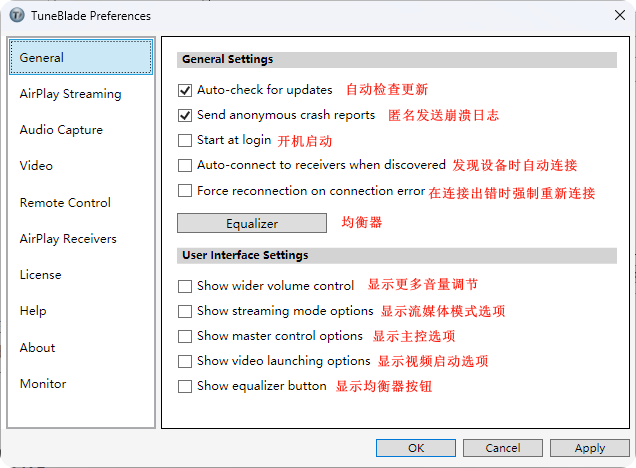
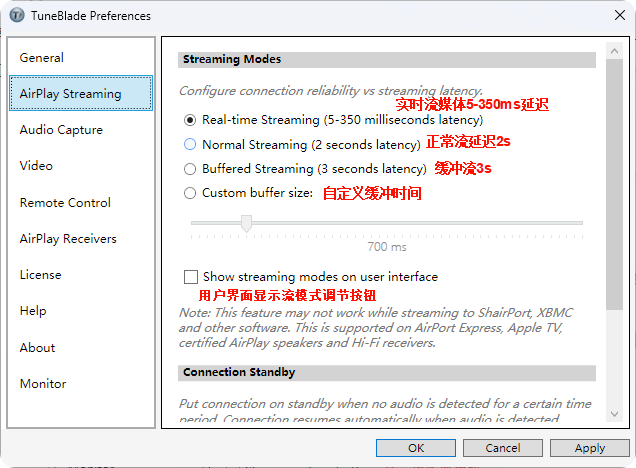
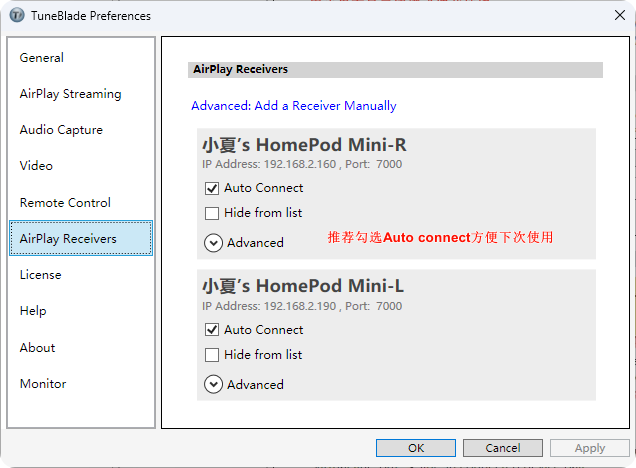
Since the software is developed by a foreign team, some Chinese users might find it slightly difficult to use. I've created a comparison translation that I hope helps other users.
1713620784520.webp
1713623171421.webp

1713621683809.webp
1713621841472.webp

1713621901378.webp
You can now enjoy using the software. For most users, the default settings are perfectly sufficient.
After using it throughout the afternoon, I've found it excellent for music playback with imperceptible latency. A fantastic tool—I'm enthusiastically recommending it!!!